
Eclipse中Maven项目创建 · Eclipse中Maven项目创建至搭建SSM
这是 2019 年的 SSM/Redis 配置记录,保留截图和旧版本用于辨认已有项目。它使用 Spring 4、javax.servlet、MySQL Connector/J 5 和 Jedis 2,不适用于直接复制到 Spring Boot 3/Jakarta 项目。文中没有交付 User 实体、Mapper 接口、登录拦截器、控制器、JSP 和建表 SQL,因此不是完整可启动应用;需结合原项目补齐这些文件。新学习项目可阅读带版本的完整任务 API。本轮只静态核对,未安装或运行旧依赖。
Eclipse中Maven项目创建
这是 2019 年的 SSM/Redis 配置记录,保留截图和旧版本用于辨认已有项目。它使用 Spring 4、javax.servlet、MySQL Connector/J 5 和 Jedis 2,不适用于直接复制到 Spring Boot 3/Jakarta 项目。文中没有交付 User 实体、Mapper 接口、登录拦截器、控制器、JSP 和建表 SQL,因此不是完整可启动应用;需结合原项目补齐这些文件。新学习项目可阅读带版本的完整任务 API。本轮只静态核对,未安装或运行旧依赖。
Eclipse中Maven项目创建
Maven项目创建
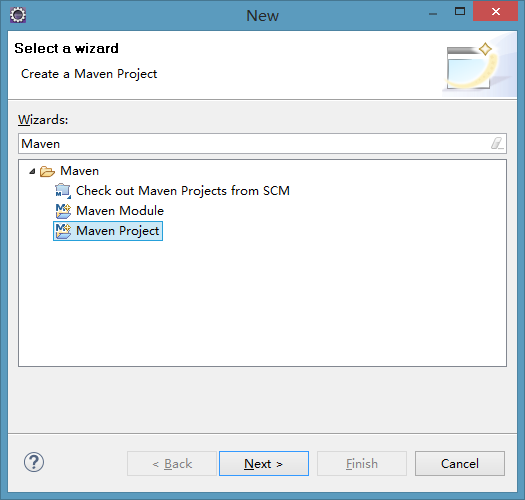
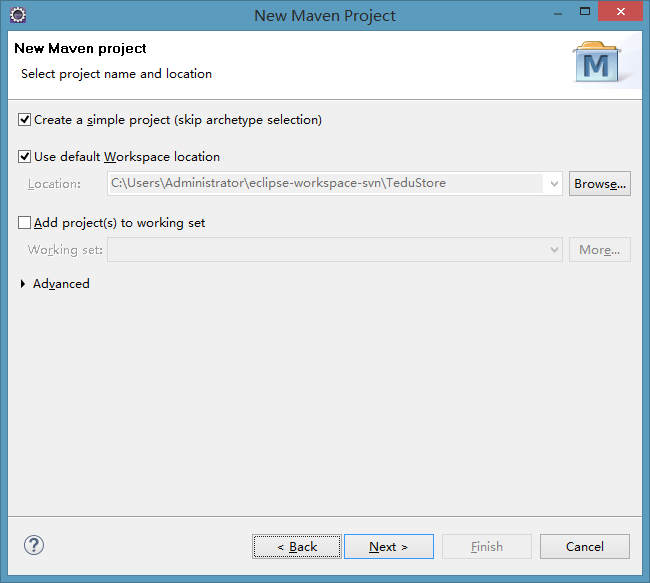
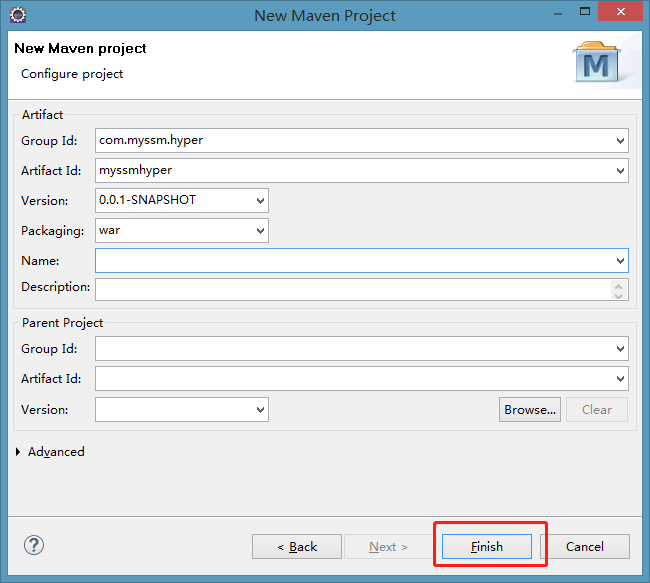
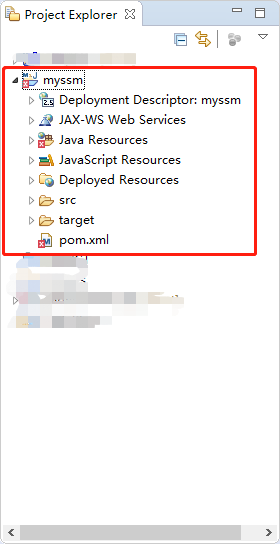
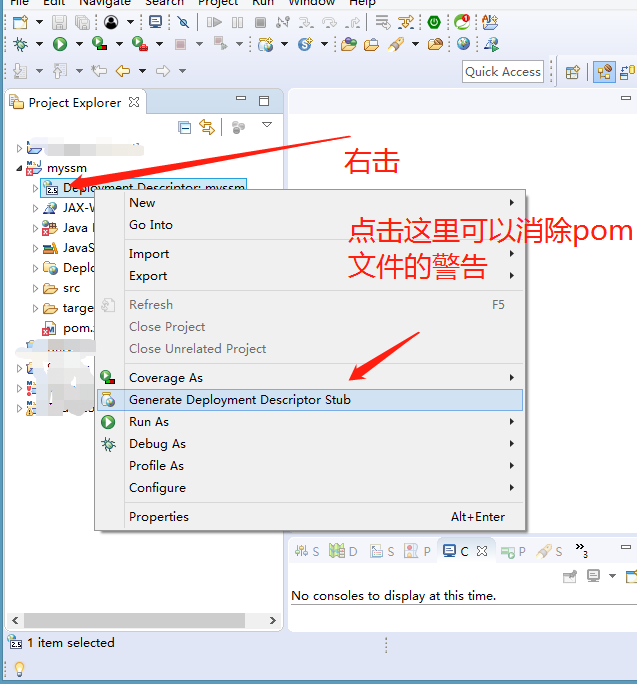
项目创建之后,要到javax.servlet下的包资源会报错解决方法
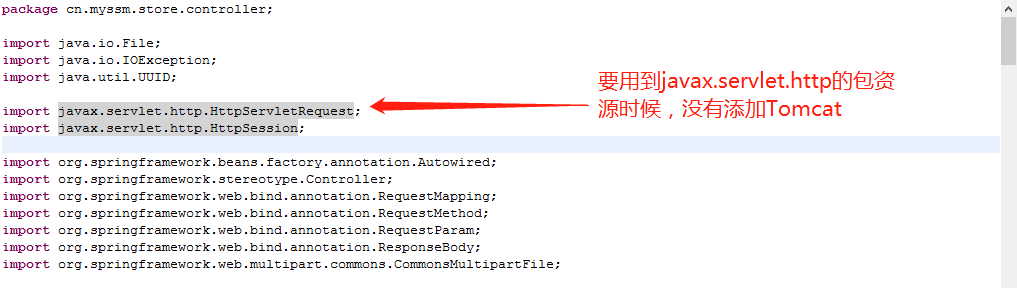
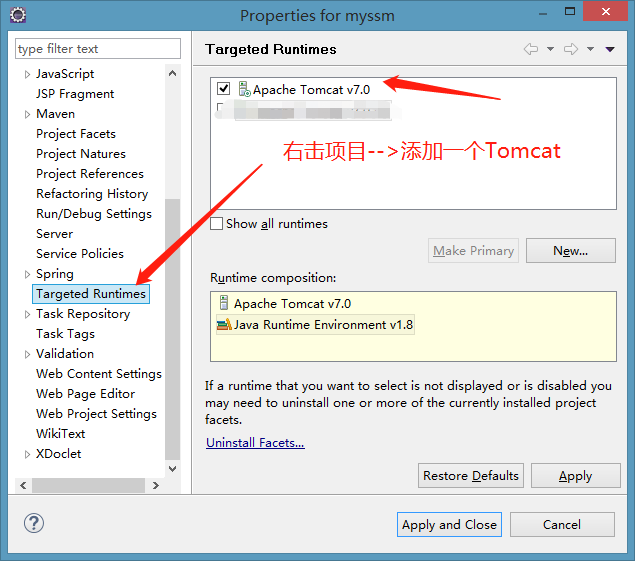
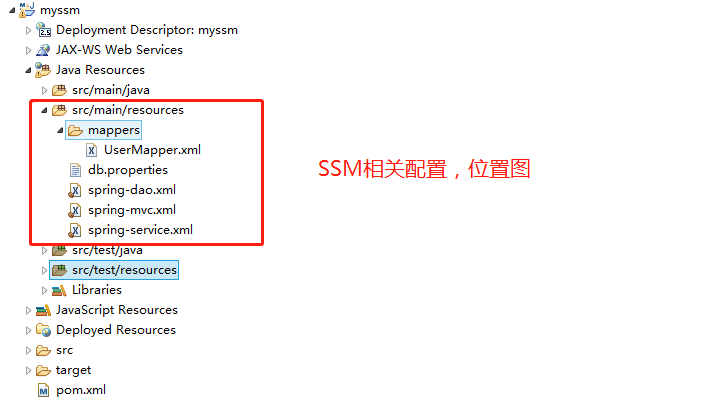
搭建SSM
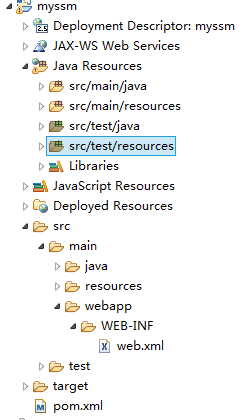
配置web.xml
配置DispatcherServlet,是SpringMVC的核心组件;本例只接收 *.do 映射的请求,再分发到匹配控制器。初始化时加载 spring-*.xml。CharacterEncodingFilter 设置请求编码;若也要强制响应编码,应明确配置 forceEncoding,而不是认为仅设置 encoding 就会覆盖所有响应。
<?xml version="1.0" encoding="UTF-8"?>
<web-app xmlns:xsi="http://www.w3.org/2001/XMLSchema-instance"
	xmlns="http://java.sun.com/xml/ns/javaee"
	xsi:schemaLocation="http://java.sun.com/xml/ns/javaee http://java.sun.com/xml/ns/javaee/web-app_2_5.xsd"
	version="2.5">
	<display-name>myssm</display-name>
	<welcome-file-list>
		<welcome-file>index.html</welcome-file>
		<welcome-file>index.htm</welcome-file>
		<welcome-file>index.jsp</welcome-file>
		<welcome-file>default.html</welcome-file>
		<welcome-file>default.htm</welcome-file>
		<welcome-file>default.jsp</welcome-file>
	</welcome-file-list>
	<!-- 配置是哪个Servlet -->
	<servlet>
		<servlet-name>SpringMVC</servlet-name>
		<servlet-class>org.springframework.web.servlet.DispatcherServlet</servlet-class>
		<!-- 当Servlet被初始化时加载Spring配置文件 -->
		<init-param>
			<param-name>contextConfigLocation</param-name>
			<param-value>classpath:spring-*.xml</param-value>
		</init-param>
		<!-- 当Tomcat启动时就初始化当前Servlet -->
		<load-on-startup>1</load-on-startup>
	</servlet>

	<!-- 配置Servlet对应的请求路径 -->
	<servlet-mapping>
		<servlet-name>SpringMVC</servlet-name>
		<url-pattern>*.do</url-pattern>
	</servlet-mapping>

	<!-- 配置字符编码过滤器 -->
	<filter>
		<filter-name>CharacterEncodingFilter</filter-name>
		<filter-class>org.springframework.web.filter.CharacterEncodingFilter</filter-class>
		<init-param>
			<param-name>encoding</param-name>
			<param-value>utf-8</param-value>
		</init-param>
		<init-param>
			<param-name>forceEncoding</param-name>
			<param-value>true</param-value>
		</init-param>
	</filter>

	<filter-mapping>
		<filter-name>CharacterEncodingFilter</filter-name>
		<url-pattern>/*</url-pattern>
	</filter-mapping>
</web-app>
配置spring-mvc.xml
组件扫描只扫描控制器包。下方视图解析器使用
/WEB-INF/和.jsp,控制器返回login时转发到/WEB-INF/login.jsp,浏览器不能直接访问这个 JSP。公开 CSS、JS 等静态资源另外放在 Web 根目录;不应为公开静态资源而把 JSP 前缀改成/。LoginInterceptor 是原项目自定义类,必须自行提供并核对包名;仅拷贝 XML 不会生成拦截器实现。
<?xml version="1.0" encoding="UTF-8"?>
<beans xmlns="http://www.springframework.org/schema/beans"
	xmlns:xsi="http://www.w3.org/2001/XMLSchema-instance"
	xmlns:context="http://www.springframework.org/schema/context"
	xmlns:jdbc="http://www.springframework.org/schema/jdbc"
	xmlns:jee="http://www.springframework.org/schema/jee"
	xmlns:tx="http://www.springframework.org/schema/tx"
	xmlns:aop="http://www.springframework.org/schema/aop"
	xmlns:mvc="http://www.springframework.org/schema/mvc"
	xmlns:util="http://www.springframework.org/schema/util"
	xmlns:jpa="http://www.springframework.org/schema/data/jpa"
	xsi:schemaLocation="
		http://www.springframework.org/schema/beans http://www.springframework.org/schema/beans/spring-beans-3.2.xsd
		http://www.springframework.org/schema/context http://www.springframework.org/schema/context/spring-context-3.2.xsd
		http://www.springframework.org/schema/jdbc http://www.springframework.org/schema/jdbc/spring-jdbc-3.2.xsd
		http://www.springframework.org/schema/jee http://www.springframework.org/schema/jee/spring-jee-3.2.xsd
		http://www.springframework.org/schema/tx http://www.springframework.org/schema/tx/spring-tx-3.2.xsd
		http://www.springframework.org/schema/data/jpa http://www.springframework.org/schema/data/jpa/spring-jpa-1.3.xsd
		http://www.springframework.org/schema/aop http://www.springframework.org/schema/aop/spring-aop-3.2.xsd
		http://www.springframework.org/schema/mvc http://www.springframework.org/schema/mvc/spring-mvc-3.2.xsd
		http://www.springframework.org/schema/util http://www.springframework.org/schema/util/spring-util-3.2.xsd">

	<!-- 开启组件扫描 -->
	<context:component-scan
		base-package="cn.myssm.store.controller" />

	<!-- 视图解析器:根据视图名称得到视图资源 -->
	<bean
		class="org.springframework.web.servlet.view.InternalResourceViewResolver">
		<!-- 配置前缀 -->
		<property name="prefix" value="/WEB-INF/" />
		<!-- 配置后缀 -->
		<property name="suffix" value=".jsp" />
	</bean>

	<!-- 配置拦截器链 -->
	<mvc:interceptors>
		<!-- 配置第1个拦截器 -->
		<mvc:interceptor>
			<!-- 1. 拦截的路径 -->
			<mvc:mapping path="/user/**" />
			<mvc:mapping path="/main/index.do" />
			<!-- 2. 例外的路径,不拦截的路径,即白名单 -->
			<mvc:exclude-mapping path="/user/reg.do" />
			<mvc:exclude-mapping path="/user/handle_reg.do" />
			<mvc:exclude-mapping path="/user/login.do" />
			<mvc:exclude-mapping path="/user/handle_login.do" />
			<!-- 3. 指定拦截器类 -->
			<bean class="cn.myssm.store.interceptor.LoginInterceptor" />
		</mvc:interceptor>
	</mvc:interceptors>

	<!-- 注解驱动 -->
	<mvc:annotation-driven />
</beans>
配置spring-service.xml
<?xml version="1.0" encoding="UTF-8"?>
<beans xmlns="http://www.springframework.org/schema/beans"
	xmlns:xsi="http://www.w3.org/2001/XMLSchema-instance"
	xmlns:context="http://www.springframework.org/schema/context"
	xmlns:jdbc="http://www.springframework.org/schema/jdbc"
	xmlns:jee="http://www.springframework.org/schema/jee"
	xmlns:tx="http://www.springframework.org/schema/tx"
	xmlns:aop="http://www.springframework.org/schema/aop"
	xmlns:mvc="http://www.springframework.org/schema/mvc"
	xmlns:util="http://www.springframework.org/schema/util"
	xmlns:jpa="http://www.springframework.org/schema/data/jpa"
	xsi:schemaLocation="
		http://www.springframework.org/schema/beans http://www.springframework.org/schema/beans/spring-beans-3.2.xsd
		http://www.springframework.org/schema/context http://www.springframework.org/schema/context/spring-context-3.2.xsd
		http://www.springframework.org/schema/jdbc http://www.springframework.org/schema/jdbc/spring-jdbc-3.2.xsd
		http://www.springframework.org/schema/jee http://www.springframework.org/schema/jee/spring-jee-3.2.xsd
		http://www.springframework.org/schema/tx http://www.springframework.org/schema/tx/spring-tx-3.2.xsd
		http://www.springframework.org/schema/data/jpa http://www.springframework.org/schema/data/jpa/spring-jpa-1.3.xsd
		http://www.springframework.org/schema/aop http://www.springframework.org/schema/aop/spring-aop-3.2.xsd
		http://www.springframework.org/schema/mvc http://www.springframework.org/schema/mvc/spring-mvc-3.2.xsd
		http://www.springframework.org/schema/util http://www.springframework.org/schema/util/spring-util-3.2.xsd">
	<!-- 开启组件扫描 -->
	<context:component-scan
		base-package="cn.myssm.store.service.impl" />
</beans>
配置db.properties
重点检查url中的数据库名称、password的值!
   url=jdbc:mysql://localhost:3306/myssm?useUnicode=true&characterEncoding=utf8
   driver=com.mysql.jdbc.Driver
   username=myssm_app
   password=REPLACE_WITH_LOCAL_PASSWORD
   initialSize=5
   maxActive=50
配置spring-dao.xml
db.properties 必须在 classpath;连接信息、数据库账号权限及池容量需要按环境配置。这里的 BasicDataSource 是 DBCP 1.x,不能直接换成 DBCP 2 的类却保留所有旧属性。 关于MapperScannerConfigurer,需要检查持久层接口所在的包!关于SqlSessionFactoryBean,需要检查持久层映射的XML文件所在的文件夹!
<?xml version="1.0" encoding="UTF-8"?>
<beans xmlns="http://www.springframework.org/schema/beans"
	xmlns:xsi="http://www.w3.org/2001/XMLSchema-instance"
	xmlns:context="http://www.springframework.org/schema/context"
	xmlns:jdbc="http://www.springframework.org/schema/jdbc"
	xmlns:jee="http://www.springframework.org/schema/jee"
	xmlns:tx="http://www.springframework.org/schema/tx"
	xmlns:aop="http://www.springframework.org/schema/aop"
	xmlns:mvc="http://www.springframework.org/schema/mvc"
	xmlns:util="http://www.springframework.org/schema/util"
	xmlns:jpa="http://www.springframework.org/schema/data/jpa"
	xsi:schemaLocation="
		http://www.springframework.org/schema/beans http://www.springframework.org/schema/beans/spring-beans-3.2.xsd
		http://www.springframework.org/schema/context http://www.springframework.org/schema/context/spring-context-3.2.xsd
		http://www.springframework.org/schema/jdbc http://www.springframework.org/schema/jdbc/spring-jdbc-3.2.xsd
		http://www.springframework.org/schema/jee http://www.springframework.org/schema/jee/spring-jee-3.2.xsd
		http://www.springframework.org/schema/tx http://www.springframework.org/schema/tx/spring-tx-3.2.xsd
		http://www.springframework.org/schema/data/jpa http://www.springframework.org/schema/data/jpa/spring-jpa-1.3.xsd
		http://www.springframework.org/schema/aop http://www.springframework.org/schema/aop/spring-aop-3.2.xsd
		http://www.springframework.org/schema/mvc http://www.springframework.org/schema/mvc/spring-mvc-3.2.xsd
		http://www.springframework.org/schema/util http://www.springframework.org/schema/util/spring-util-3.2.xsd">

	<!-- 读取db.properties -->
	<util:properties id="dbConfig"
		location="classpath:db.properties" />

	<!-- 配置数据源:BasicDataSource -->
	<bean id="ds"
		class="org.apache.commons.dbcp.BasicDataSource">
		<!-- 以下配置中 -->
		<!-- name的值是BasicDataSource中的属性名(方法名) -->
		<!-- value的值是引用以上读取的配置文件 -->
		<property name="url"
			value="#{dbConfig.url}" />
		<property name="driverClassName"
			value="#{dbConfig.driver}" />
		<property name="username"
			value="#{dbConfig.username}" />
		<property name="password"
			value="#{dbConfig.password}" />
		<property name="initialSize"
			value="#{dbConfig.initialSize}" />
		<property name="maxActive"
			value="#{dbConfig.maxActive}" />
	</bean>

	<!-- 配置MapperScannerConfigurer -->
	<bean class="org.mybatis.spring.mapper.MapperScannerConfigurer">
		<!-- 配置接口文件所在的包 -->
		<property name="basePackage"
			value="cn.myssm.store.mapper" />
	</bean>

	<!-- 配置SqlSessionFactoryBean -->
	<bean class="org.mybatis.spring.SqlSessionFactoryBean">
		<!-- 配置使用哪个数据源,ref属性的值是前序配置的数据源的bean id -->
		<property name="dataSource"
			ref="ds" />
		<!-- 配置XML映射文件的位置 -->
		<property name="mapperLocations"
			value="classpath:mappers/*.xml" />
	</bean>
</beans>继续阅读
- 开发实践Eclipse中Maven项目创建 · 历史版本
- 开发实践
- 排错